NOTE:
The illustration shows a representing model. Perform the same procedures for the other models.
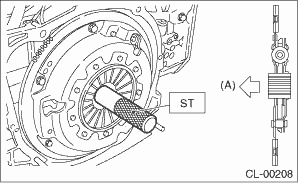
1. Insert the ST into the clutch disc and attach to the flywheel by inserting the ST end into pilot bearing.
NOTE:
When installing the clutch disc, be careful to attach in the correct direction.
| ST 499747100 | CLUTCH DISC GUIDE |
|
(A) |
Flywheel side |
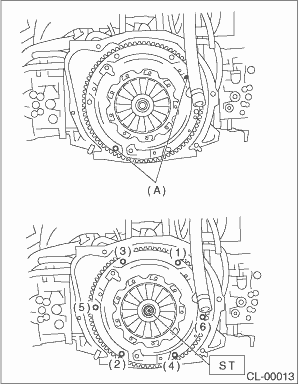
2. Install the clutch cover to the flywheel and tighten the bolts to the specified torque.
NOTE:
• When installing a clutch cover to the flywheel, position the clutch cover so that the spacing between the unbalance marks ( paint mark) on the flywheel and clutch cover is 120° or more apart. (The unbalance mark indicates the direction of residual unbalance.)
• Note the front and rear of the clutch disc when installing.
• Temporarily tighten the bolts by hand. Each bolt should be tightened to the specified torque in a crisscross order.
Tightening torque:
16 N·m (1.6 kgf-m, 11.8 ft-lb)
|
(A) |
Unbalance mark (paint) |
3. Remove the ST.
| ST 499747100 | CLUTCH DISC GUIDE |
4. Install the transmission assembly. 