1. Prepare the Subaru Select Monitor kit. 
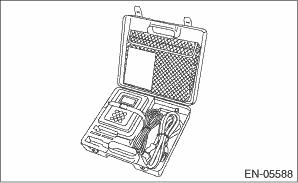
2. Prepare PC with Subaru Select Monitor installed.
3. Connect the USB cable to SDI (Subaru Diagnosis Interface) and USB port on the personal computer (dedicated port for the Subaru Select Monitor).
NOTE:
The dedicated port for the Subaru Select Monitor means the USB port which was used to install the Subaru Select Monitor.
4. Connect the diagnosis cable to SDI.
5. Connect SDI to data link connector located in the lower portion of the instrument panel (on the driver’s side).
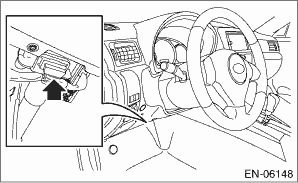
CAUTION:
Do not connect any scan tools except Subaru Select Monitor or general scan tool.
6. Start the PC.
7. Turn the ignition switch to ON (engine OFF) and run the “PC application for Subaru Select Monitor”.
8. On «Main Menu» display, select {Each System Check}.
9. On «System Selection Menu» display, select {Engine Control System}.
10. Click the [OK] button after the information of engine type has been displayed.
11. On «Engine Diagnosis» display, select {Compulsory learning mode}.
12. The following items are displayed on the display.
|
Display |
|
Fuel pump duty learning |
|
Fuel injector injection amount learning |
|
EGR valve opening angle learning |
CAUTION:
After executing the compulsory learning mode, execute the Clear Memory Mode.
NOTE:
Compulsory learning mode must be started with the ignition switch ON (engine OFF).
1. On «Compulsory learning mode» display, select {Fuel pump duty learning}.
2. On «Start learning? When the learning process has been aborted, learning must be started again and must be completed.» display, click the [OK] button.
3. On «Start the Engine» display, start the engine and click the [OK] button.
4. On «Learning can be performed when required operating conditions are fulfilled. (for details refer to Service Manual)» display, click the [OK] button.
5. On the «Keep engine speed above 2500 rpm for five seconds or more» display, click the [OK] button after performing the instruction displayed.
6. On the «Return to idling. Start learning» display, release the accelerator pedal and click the [OK] button.
NOTE:
Learning starts if engine coolant temperature is higher than 60°C (140°F). Learning is performed when the following conditions are met.
• Vehicle parked
• Battery voltage: 12 V — 15 V
• Accelerator pedal released
• Fuel temperature: 20 — 60°C (68 — 140°F)
• Engine speed and common rail pressure stable condition
7. On «Learning finished» display screen, click the [OK] button to finish the fuel pump duty learning. The screen will return to the «Compulsory learning mode» screen.
8. Make sure the «Fuel pump learning» is «Completed» using Subaru Select Monitor.
NOTE:
• For detailed operation procedures, refer to “READ CURRENT DATA FOR ENGINE” and “PC application help for Subaru Select Monitor”.
• When the learning fails to start or end, perform the learning again.
2. FUEL INJECTOR INJECTION AMOUNT LEARNING
CAUTION:
After executing the compulsory learning mode, execute the Clear Memory Mode.
NOTE:
Compulsory learning mode must be started with the ignition switch ON (engine OFF).
1. On «Compulsory learning mode» display, select {Fuel injector injection amount learning}.
2. On «Start learning?» display, click the [OK] button.
3. «Replaced injector?» display screen appears. If the fuel injector was replaced, click the [Yes] button, if not replaced, click the [No] button.
4. Click [OK] button in the «Be aware that engine speed changes during learning process» display.
5. On «Start the Engine» display, start the engine and click the [OK] button.
NOTE:
• After the engine starts, if engine coolant temperature is less than 80°C (176°F), «Warm up the engine until water temp. becomes over 80°C (176°F)» display screen appears. If this appears, warm-up the engine until engine coolant temperature is higher than 80°C (176°F).
• After the engine starts, learning starts if engine coolant temperature is higher than 80°C (176°F). Learning is performed when the following conditions are met.
• Vehicle parked
• Atmospheric Pressure: 80 kPa (600 mmHg) or more
• Accelerator pedal released
• Fuel temperature: 35 — 65°C (95 — 149°F)
• Intake air temperature (air flow sensor): 15 — 65°C (59 — 149°F)
• Electric load OFF
• Engine speed and common rail pressure stable condition
• Clutch switch OFF
6. On «Learning is finished» display screen, click the [OK] button to finish the fuel injector injection amount learning. The screen will return to the «Compulsory learning mode» screen.
7. Make sure the «Injector learning» is «Completed» using Subaru Select Monitor.
NOTE:
• For detailed operation procedures, refer to “READ CURRENT DATA FOR ENGINE” and “PC application help for Subaru Select Monitor”.
• If the learning can not be started or finished correctly, inspect each check item according to display content, perform the learning again.
|
Display |
Check Item |
|
01. Idling condition not established |
• Neutral position switch • Electronic throttle control • Air flow sensor • Crankshaft position sensor • Fuel injector • Fuel pump • EGR control valve • Air intake system |
|
02. Vehicle speed condition not established |
Vehicle parked condition |
|
03. Accelerator condition not established |
• Accelerator pedal released condition • Accelerator pedal position sensor |
|
04. Engine load OFF not established |
• Electric load OFF condition • Power steering OFF condition |
|
05. Clutch OFF not established |
Clutch Switch |
|
06. Temperature condition not established |
• Fuel temperature condition • Intake air condition (air flow meter) |
|
07. Atmospheric pressure condition not established |
• Atmospheric pressure • Atmospheric pressure sensor |
|
08. Related sensor and actuator abnormal |
DTC detecting condition |
|
09. Pump learning not completed |
Fuel pump duty learning condition |
|
11. Engine speed unstable |
• Electronic throttle control • Air flow sensor • Crankshaft position sensor • Fuel injector • Fuel pump • EGR control valve • Air intake system |
|
12. Common rail pressure unstable |
• Common rail system piping condition • Common rail system pressure control condition |
|
13. Commanded injection amount value too small |
Fuel injector |
|
21. ISC unstable |
• Electronic throttle control • Air flow sensor • Crankshaft position sensor • Fuel injector • Fuel pump • EGR control valve • Air intake system |
|
22. Engine speed changes between cylinders unstable |
• Electronic throttle control • Air flow sensor • Crankshaft position sensor • Fuel injector • Fuel pump • EGR control valve • Air intake system |
|
23. Engine speed unstable |
• Electronic throttle control • Air flow sensor • Crankshaft position sensor • Fuel injector • Fuel pump • EGR control valve • Air intake system |
|
24. Common rail pressure unstable |
• Common rail system piping condition • Common rail system pressure control condition |
|
25. Learning value beyond upper/lower limit |
• Electronic throttle control • Air flow sensor • Crankshaft position sensor • Fuel injector • Fuel pump • EGR control valve • Air intake system |
3. EGR VALVE OPENING ANGLE LEARNING
CAUTION:
After executing the compulsory learning mode, execute the Clear Memory Mode.
NOTE:
Compulsory learning mode must be started with the ignition switch ON (engine OFF).
1. On «Compulsory learning mode» display, select {EGR valve opening angle learning}.
2. On «Start learning?» display, click the [OK] button.
3. On «Learning can be done while coolant temperature stays at 20 — 60°C (68 — 140°F)» display screen, click the [OK] button.
4. If the engine coolant temperature is 20 — 60°C (68 — 140°F), «Coolant temperature within target range (20 — 60°C (68 — 140°F)) is met. Start learning?» display screen appears. When this screen appears, click the [OK] button.
NOTE:
• If the engine coolant is less than 20°C (68°F), «Warm-up the engine.» display screen appears. Click the [OK] button to end the EGR valve opening angle learning. The screen will return to the «Compulsory learning mode» screen.
• If the engine coolant temperature is 60°C (140°F) or higher, «Wait until coolant temperature becomes below 60°C (140°F). Press “Cancel” to stop» display screen appears. Click the [Cancel] button to end the EGR valve opening angle learning. The screen will return to the «Compulsory learning mode» screen.
• If engine coolant condition is not met, warm up or cool the engine until the engine coolant temperature is 20 — 60°C (68 — 140°F) and then perform the procedure from step 1) again. At this time, even if malfunction indicator light illuminates, EGR valve opening angle learning will be normally performed. After the EGR valve opening angle learning ends, perform Clear Memory Mode to turn off the malfunction indicator light.
5. On «Turn off the ignition switch.» display screen, turn the ignition switch to OFF.
6. On «Learning is finished. Turn the Ignition Switch on.» display, turn the ignition switch to ON and click the [OK] button. Learning is finished, and display screen returns to «Compulsory learning mode».
NOTE:
On «Learning is finished. Turn the Ignition Switch on.» display, if two seconds pass without turning the ignition switch to ON, «Communication error has occurred.» display screen may appear. Learning is finished correctly, even if «Communication error has occurred.» display screen appears.
7. Make sure the «EGR learning» is «Completed» using Subaru Select Monitor.
NOTE:
• For detailed operation procedures, refer to “READ CURRENT DATA FOR ENGINE” and “PC application help for Subaru Select Monitor”.
• When the learning fails to start or end, perform the learning again.