1. Remove the steering column. 
2. Disconnect the connector from the stop light switch and clutch switch.
3. Remove the snap pin that fastens the lever and push rod to the operating rod.
4. Remove the clevis pin that fastens the lever and push rod to the operating rod.
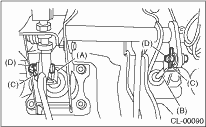
|
(A) |
Operating rod |
|
(B) |
Push rod |
|
(C) |
Snap pin |
|
(D) |
Clevis pin |
5. Remove the accelerator pedal.
6. Remove the air cleaner case and intake duct. (Non-turbo model)
7. Remove the intercooler. (Turbo model)
8. Remove the PHV adjusting nut and lock nut. (Model with hill holder)
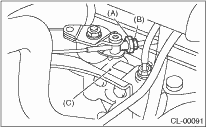
|
(A) |
Adjusting nut |
|
(B) |
Lock nut |
|
(C) |
PHV |
9. Remove the cable clamp and disconnect the PHV cable from the PHV. (Model with hill holder)
CAUTION:
When disconnecting the PHV cable, carefully protect the boot and inner cable so that they do not get damaged.
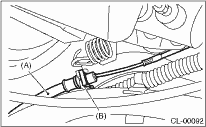
|
(A) |
PHV cable |
|
(B) |
Clamp |
10. Remove the nut that fastens the clutch master cylinder.
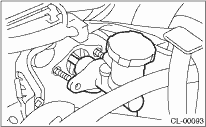
11. Remove the bolt and nut that fastens the brake pedal and clutch pedal and remove the pedal assembly.
1. Disconnect the ground cable from the battery.
2. Loosen the screws and clips, then remove the lower cover.
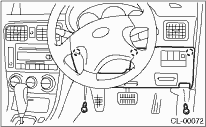
3. Disconnect the clutch switch connector. (Model with cruise control)
4. Remove the snap pin connecting the clutch pedal and clutch master cylinder rod, and pull out the clevis pin.
5. Remove the clutch master cylinder mounting nut.
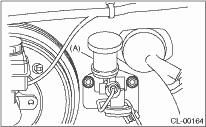
|
(A) |
Master cylinder |
6. Remove the PHV adjusting nut and lock nut. (Model with hill holder)
|
(A) |
Adjusting nut |
|
(B) |
Lock nut |
|
(C) |
PHV |
7. Remove the cable clamp and disconnect the PHV cable from the PHV. (Model with hill holder)
CAUTION:
When disconnecting the PHV cable, carefully protect the boot and inner cable so that they do not get damaged.
|
(A) |
PHV cable |
|
(B) |
Clamp |
8. Remove the clutch pedal bracket.
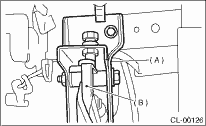
|
(A) |
Clutch pedal bracket |
|
(B) |
Clutch pedal |