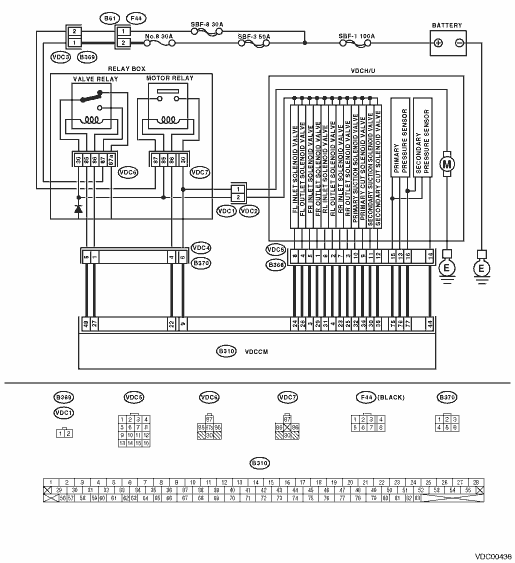
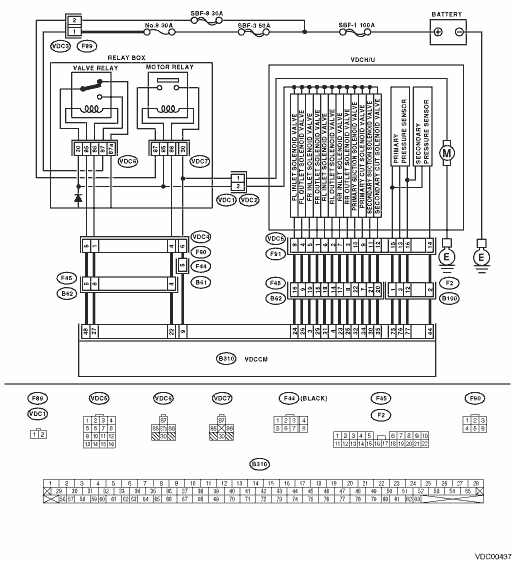
1.CHECK RESISTANCE OF SOLENOID VALVE.
1) Turn the ignition switch to OFF.
2) Disconnect two connectors (VDC1, B368) (LHD model) and (VDC1, F91) (RHD model) from VDCH/U.
3) Measure the resistance between VDCH/U connector terminals.
Connector & terminal
DTC 32
(VDC5) No. 1 — (VDC2) No. 2:
DTC 34
(VDC5) No. 4 — (VDC2) No. 2:
DTC 36
(VDC5) No. 3 — (VDC2) No. 2:
DTC 38
(VDC5) No. 2 — (VDC2) No. 2:
DTC 63
(VDC5) No. 10 — (VDC2) No. 2:
DTC 64
(VDC5) No. 11 — (VDC2) No. 2:
|
Is the resistance between 3.8 — 4.8 Ω?
|
|
Replace the VDCH/U. 
|
2.CHECK SOLENOID VALVE GROUND SHORT.
Measure the resistance between VDCH/U connector and chassis ground.
Connector & terminal
DTC 32
(VDC5) No. 1 — Chassis ground:
DTC 34
(VDC5) No. 4 — Chassis ground:
DTC 36
(VDC5) No. 3 — Chassis ground:
DTC 38
(VDC5) No. 2 — Chassis ground:
DTC 63
(VDC5) No. 10 — Chassis ground:
DTC 64
(VDC5) No. 11 — Chassis ground:
|
Is the resistance 1 MΩ or more?
|
|
Replace the VDCH/U.
|
3.CHECK SOLENOID VALVE BATTERY SHORT.
1) Disconnect the connectors from VDCCM.
2) Measure the voltage between VDCH/U connector and chassis ground.
Connector & terminal
DTC 32
(VDC5) No. 1 (+) — Chassis ground (−):
DTC 34
(VDC5) No. 4 (+) — Chassis ground (−):
DTC 36
(VDC5) No. 3 (+) — Chassis ground (−):
DTC 38
(VDC5) No. 2 (+) — Chassis ground (−):
DTC 63
(VDC5) No. 10 (+) — Chassis ground (−):
DTC 64
(VDC5) No. 11 (+) — Chassis ground (−):
|
Is the voltage less than 1 V?
|
|
Replace the VDCH/U.
|
4.CHECK SOLENOID VALVE BATTERY SHORT.
1) Turn the ignition switch to ON.
2) Measure the voltage between VDCH/U connector and chassis ground.
Connector & terminal
DTC 32
(VDC5) No. 1 (+) — Chassis ground (−):
DTC 34
(VDC5) No. 4 (+) — Chassis ground (−):
DTC 36
(VDC5) No. 3 (+) — Chassis ground (−):
DTC 38
(VDC5) No. 2 (+) — Chassis ground (−):
DTC 63
(VDC5) No. 10 (+) — Chassis ground (−):
DTC 64
(VDC5) No. 11 (+) — Chassis ground (−):
|
Is the voltage less than 1 V?
|
|
Replace the VDCH/U.
|
5.CHECK BATTERY SHORT OF HARNESS.
1) Turn the ignition switch to OFF.
2) Measure the voltage between VDCCM connector and chassis ground.
Connector & terminal
DTC 32
(B310) No. 29 (+) — Chassis ground (−):
DTC 34
(B310) No. 26 (+) — Chassis ground (−):
DTC 36
(B310) No. 25 (+) — Chassis ground (−):
DTC 38
(B310) No. 4 (+) — Chassis ground (−):
DTC 63
(B310) No. 32 (+) — Chassis ground (−):
DTC 64
(B310) No. 30 (+) — Chassis ground (−):
|
Is the voltage less than 1 V?
|
|
Repair the harness between VDCCM and VDCH/U.
|
6.CHECK BATTERY SHORT OF HARNESS.
1) Turn the ignition switch to ON.
2) Measure the voltage between VDCCM connector and chassis ground.
Connector & terminal
DTC 32
(B310) No. 29 (+) — Chassis ground (−):
DTC 34
(B310) No. 26 (+) — Chassis ground (−):
DTC 36
(B310) No. 25 (+) — Chassis ground (−):
DTC 38
(B310) No. 4 (+) — Chassis ground (−):
DTC 63
(B310) No. 32 (+) — Chassis ground (−):
DTC 64
(B310) No. 30 (+) — Chassis ground (−):
|
Is the voltage less than 1 V?
|
|
Repair the harness between VDCCM and VDCH/U.
|
7.CHECK GROUND SHORT OF HARNESS.
1) Turn the ignition switch to OFF.
2) Measure the resistance between VDCCM connector and chassis ground.
Connector & terminal
DTC 32
(B310) No. 29 — Chassis ground:
DTC 34
(B310) No. 26 — Chassis ground:
DTC 36
(B310) No. 25 — Chassis ground:
DTC 38
(B310) No. 4 — Chassis ground:
DTC 63
(B310) No. 32 — Chassis ground:
DTC 64
(B310) No. 30 — Chassis ground:
|
Is the resistance 1 MΩ or more?
|
|
Repair the harness between VDCCM and VDCH/U.
|
8.CHECK HARNESS CONNECTOR BETWEEN VDCCM AND VDCH/U.
1) Connect the connectors (B368) (LHD model) and (F91) (RHD model) to VDCH/U.
2) Measure the resistance between the VDCCM connector and VDCH/U connector.
Connector & terminal
DTC 32
(B310) No. 29 — (VDC2) No. 1:
DTC 34
(B310) No. 26 — (VDC2) No. 1:
DTC 36
(B310) No. 25 — (VDC2) No. 1:
DTC 38
(B310) No. 4 — (VDC2) No. 1:
DTC 63
(B310) No. 32 — (VDC2) No. 1:
DTC 64
(B310) No. 30 — (VDC2) No. 1:
|
Is the resistance between 4 — 6 Ω?
|
|
Repair the harness connector between VDCCM and VDCH/U.
|
9.CHECK POOR CONTACT OF CONNECTOR.
|
Is there poor contact in connector between the VDCCM and VDCH/U?
|
|
|
10.CHECK THE VDCCM.
1) Connect all connectors.
3) Perform the Inspection Mode.
|
Is the same DTC displayed again?
|
Replace the VDCCM.
|
|
11.CHECK ANY OTHER DTC ON DISPLAY.
|
Are other DTCs displayed?
|
Go to the diagnosis corresponding to the DTC.
|
Temporary poor contact occurs.
|